Photo Selection
How to Select the Best Wedding Photos Faster
A wedding can produce 3,000 photographs across a day or two, and none of them are useful until somebody chooses. The photographers who keep up treat selection as two separate jobs run in order: their own cull, then the couple's choice, folder by folder, with AI taking the repetitive first look. This guide sets out that method end to end, from the upload to the set that is locked and ready to download.
By Smart Photo Selection TeamUpdated 4 min readIn Photo Selection
Why selecting wedding photos takes so long
Selection is slow because two different decisions get mixed together. You are deciding which frames are technically usable; the couple is deciding which moments matter to them. Neither decision can be made on the other's behalf, and a single pass over the same 3,000 photos tries to do both at once. Separate them, run them in order, and the whole step gets shorter.
Select in two passes, not one
| Pass | Who | What it decides |
|---|---|---|
| 1. Cull | Photographer | Removes missed focus, test frames and repeated shots before anyone else sees them |
| 2. Select | Client | Marks the favourites they want edited, printed, albumed or delivered |
| 3. Submit | Client | Locks the set so it cannot change by accident |
Run the first pass yourself, folder by folder: haldi, mehendi, ceremony, reception, each in its own folder inside the booking. The gallery shows a photo count for every folder and groups anything uploaded without one, so a stray set of frames cannot disappear. The upload and organise guide covers the structure.
- Technically unusable: missed focus, shutter shake, a frame fired by accident.
- Belongs to nobody: test shots, monitor frames, the empty room before guests arrive.
- Repeated: the same moment shot three times — keep the best frame, not all three.
- Unflattering frames the client should never have to scroll past while choosing.
- One standard, applied everywhere: decide the rule once and use it in every folder, not a stricter one at the end of the day.
Let AI shorten the first pass
AI-assisted culling sets aside blurry and duplicate frames and scores what remains for sharpness, exposure and faces, so the first look at 3,000 photos takes minutes rather than an evening. It is a suggestion, not a verdict: the quiet frames that carry the story are exactly the ones an automated pass tends to undervalue. Read AI photo selection for wedding photographers for where the scores help and where they mislead.
Give the couple a gallery, not a folder
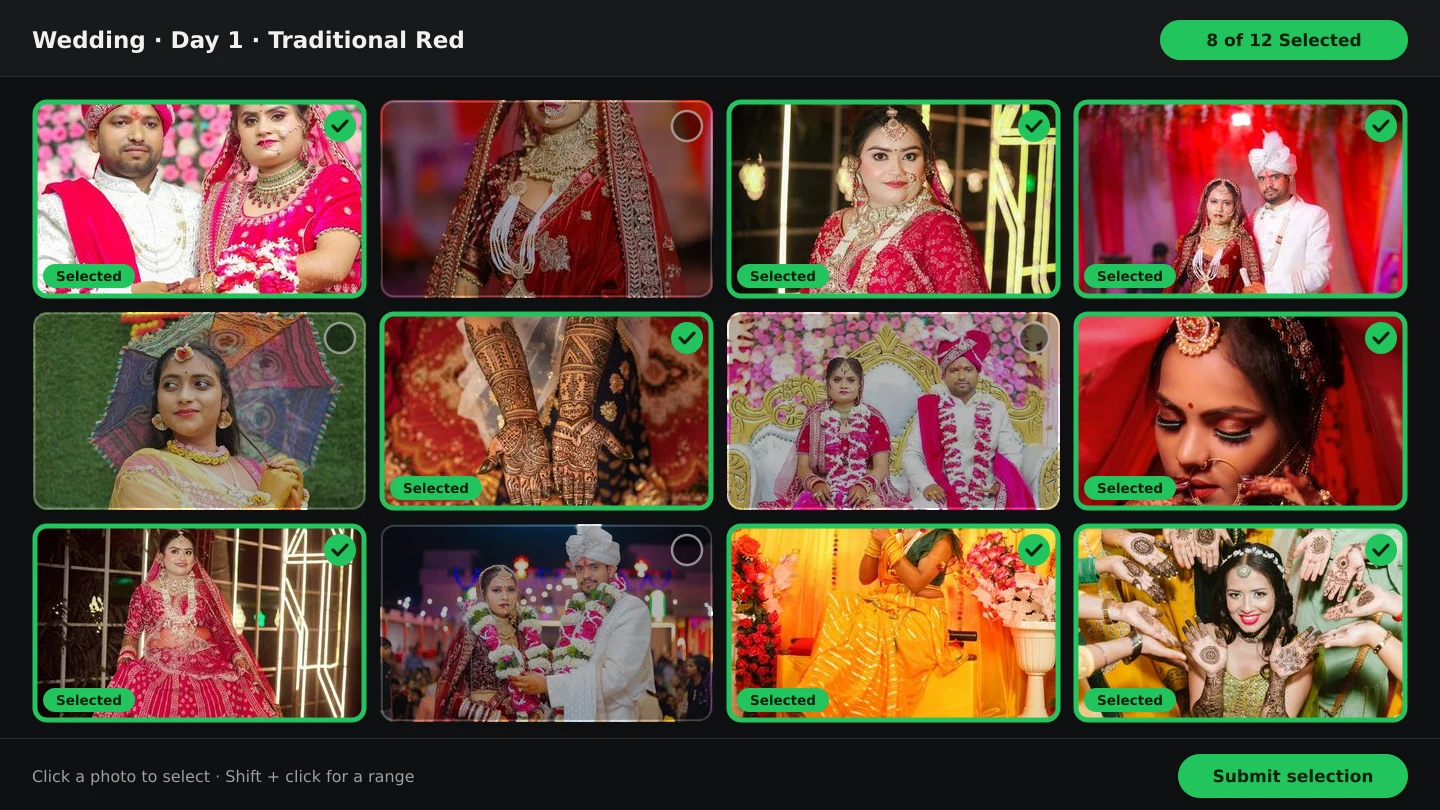
Once the cull is done, share the booking's gallery link. The couple opens it in a browser — no account, nothing to download in bulk — sees your studio name and contact details at the top, and marks photos as selected folder by folder. They can filter to just their selections, use select all or unselect all on a view, and submit when they are happy. Their submission locks the set, and you download exactly those photos as a ZIP. The client photo selection workflow explains the step in full.
Before you call the selection finished
Enough photos is a package question, not a rule. If the album will run to 20 spreads and each sheet holds between 5 and 10 photos, the couple needs something in the region of 100 to 150 favourites — not 600. A preview gallery for friends can be larger; a print shortlist can be smaller. Agree the target before they start choosing, then run this checklist:
- Every folder has been through the cull, and nothing unusable is still visible.
- The couple knows the target number and the deadline for submitting.
- Their selection is submitted, not merely discussed in a message.
- The set is downloaded as a ZIP and backed up outside the booking.
- The booking's photo period is long enough for the editing and album work ahead.
- The album starts from the submitted set, with any additions recorded as changes.
photo selectionwedding photographycullingworkflow
Frequently Asked Questions
How long should client photo selection take?
Agree a deadline up front — a week or two is common — and remind the couple before it passes. An open-ended selection is the usual cause of a delayed album.
Should I cull before the couple sees anything?
Yes. Culling removes frames that should never reach the client, so they choose from a clean gallery instead of scrolling past misses and test shots.
What if the couple selects too many photos?
Restate the target you agreed in the brief and what it means for the album: more photos per sheet means each one reads smaller. A photos per spread comparison helps explain it.
Can the selection change after they submit?
Submission locks the set so photos cannot be selected, uploaded or deleted by mistake. Treat anything added later as a recorded change.
How do I get the chosen photos out of Smart Photo Selection?
Download the submitted selection as a ZIP, ready for editing or delivery. Client downloads can be turned on or off per booking.
Articles in This Series
- The Client Photo Selection Workflow, Start to FinishHow client photo selection works online: share a gallery, let the client mark favourites, lock the set on submission and download exactly what they chose.
- AI Photo Selection for Wedding PhotographersWhat AI photo selection does with sharpness, exposure, faces and duplicates, and how to use it on a wedding shoot without losing the moments that matter.
- A Wedding Photo Culling Workflow That Keeps UpA repeatable culling workflow for wedding photographers: remove rejects, break ties between near-duplicates and hand a clean gallery to the couple.
- What Is Photo Selection Software? The Complete Photographer's GuidePhoto selection software explained: online galleries, client proofing, AI shortlists and face search — what it does, who needs it and how it differs from culling.
- Photo Selection vs Photo Culling: What's the Difference?Culling removes rejects on your computer; selection collects the client's decision online. What each step does, who it serves, and the order that works.
- Best Photo Selection Software for Wedding Photographers: How to ChooseHow wedding photographers should compare photo selection software: online proofing, AI shortlists, face search, album handoff — and the questions that reveal fit.
- Face Scan: Find Any Person's Photos in an Event GalleryHow a face scan photo finder works: a guest scans their face in the phone browser and sees only the event photos they appear in, with no app and no account.
- What Is Wedding Album Automation?Wedding album automation explained: upload a PSD template once, confirm the photo slots, and map every wedding's photos into finished sheets automatically.
- The Complete Wedding Photography WorkflowOne workflow from the wedding day to delivery: folder uploads, culling, client selection, face scan for guests, gallery delivery and album sheets.
- How AI Chooses Photos and Album LayoutsWhat Smart Photo Selection's AI measures — sharpness, exposure, faces, orientation and duplicates — and how those signals become a hero photo and a balanced spread.
- AI Wedding Album Design: The Complete GuideHow AI wedding album design works, what it does well, where you still decide, and a practical workflow from photo selection to print-ready export.
- Bleed, Safe Area and the Centre Fold in Wedding AlbumsWhat bleed, trim, safe area and the centre fold mean for wedding album spreads, how binding affects the gutter, and how to keep faces and text safe.
- How Many Photos per Wedding Album Spread?Choosing how many photos to put on each wedding album spread: density, pacing, hero images, page splits like 3 + 4, and when fewer photos tell more.
- 12 × 36 vs 14 × 40 Wedding Album: Which Size Should You Offer?12x36 vs 14x40 wedding albums compared: page size, ratio, pixels at 300 DPI, photo resolution needed and which layouts and clients each size suits best.
- Double Exposure Wedding Album Ideas That Actually WorkTen double exposure pairings for wedding album spreads, how to choose photos that blend well, where to place them in the album and when to avoid the effect.
- Indian Wedding Album Design Ideas: Haldi, Mehndi, Sangeet, Wedding and ReceptionIndian wedding album design ideas for every function: haldi, mehndi, sangeet, baraat, pheras, vidaai and reception, with layouts, palettes and pacing.
- Wedding Photo Colour Grading Styles: Choosing a Look That LastsWarm, film, clean and bright, moody cinematic or teal and orange: how each wedding colour grading style works, who it suits and how to keep albums consistent.
- Natural Skin Retouching for Wedding Photos: What to Fix and What to LeavePrinciples of natural skin retouching for wedding albums: what to remove, what to keep, preserving texture, consistency across spreads and asking clients.
- JPG vs PNG vs TIFF vs PSD: Which File Format for Wedding Albums?Which file format to send your album lab: JPG, PNG, TIFF or PSD compared on quality, size, layers and colour profiles, and what Smart Photo Selection exports today.
- A Wedding Album Delivery Workflow for PhotographersA practical album workflow for wedding photographers: client photo selection, design, review rounds, revisions, lab checks, printing and final delivery.
- From Selected Photos to a Finished AlbumTurn a couple's submitted selection into printable album sheets: create the project, choose the photos, generate, review, edit and export at full size.
- How to Find Bride and Groom Photos FasterPractical ways to locate bride and groom photos across a wedding gallery of thousands: folder structure, selection marks and face-based search.
- How to Deliver Wedding Photos FasterShorten the gap between the wedding and the final handover: background uploads, an early cull, online selection, one gallery link and ZIP delivery.
- Face Scan vs Manual Photo Search: What Helps GuestsA clear comparison of face scan photo finding and manual gallery search: speed, coverage, privacy and what each approach means for photographers.
Step-by-Step Guides
- How to Upload and Organize Event PhotosUpload a full wedding shoot into Smart Photo Selection, keep one folder per function, recover failed uploads and check the gallery is organised before you cull.
- How to Cull Photos Before SelectionCull the raw shoot in Smart Photo Selection: review folders at full size, remove blinks, blurs and test frames, and keep the client's view clean before selection.
- How to Select Photos Manually in Smart Photo SelectionChoose photos by hand in the Smart Photo Selection gallery: folder tabs, the Selected and Not Selected filters, full-size preview, Select All and saving the selection.
- How to Send Photos to Clients for SelectionHand a gallery to the couple for photo selection: share the link or QR, let them mark frames with Done, then submit so the agreed set is locked for delivery.
Related Features
Design Your Next Album in Smart Photo Selection
Generate spreads from a booking's photos, refine them in the layer-based editor and export print-ready files.