Photography Business
Best Photo Selection Software for Wedding Photographers: How to Choose
There is no single best photo selection tool — there is the one whose workflow matches a wedding studio's bottleneck. This guide gives you the comparison method: the six capabilities that decide fit, how online selection and desktop culling differ, and the questions to ask on a trial before a wedding season depends on the answer.
By Smart Photo Selection TeamUpdated 3 min readIn Photography Business
Start from your bottleneck
Studios stall in different places. If choosing RAW keepers at your desk eats the week, your bottleneck is culling and a desktop ranking tool helps most. If clients take months to answer, your bottleneck is proofing and an online gallery with a submit step helps most. If guests message for weeks after every wedding, your bottleneck is guest delivery and a face finder helps most. Name yours before comparing anything — the 'best' tool is the one aimed at it.
The six capabilities that decide fit
- Bulk upload that survives a wedding: thousands of photos into folders, background progress, retry for failures. Ask for the largest single shoot a trial can take.
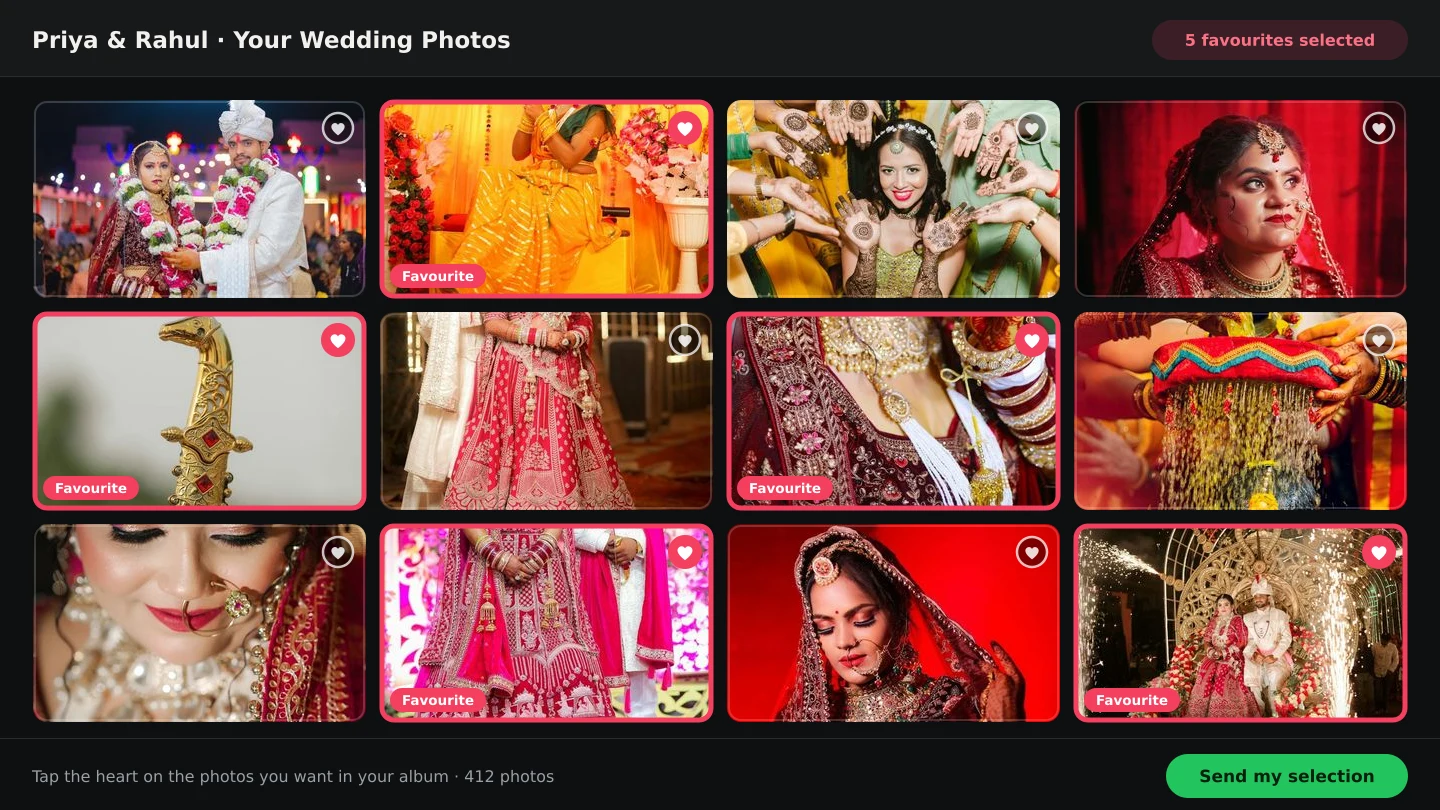
- Client proofing with a lock: favourites plus a submit action that freezes the set. Without the lock you have a wishlist, not an approval.
- Zero-friction access: a browser link, no client account. Time how long a non-technical relative takes to open it and mark one photo.
- An assisted first pass: AI scores with readable reasons beat black-box auto-selects, because you will override plenty — deliberately soft frames, dark receptions, meaningful quiet moments.
- Guest self-service: face search on the same gallery, so the crowd stops queuing in your inbox.
- An album path: the approved set should flow into album design — generated spreads or your own templates — without another export chain.
Online selection vs desktop culling
These are complementary, not competing. Desktop culling ranks files on your computer before anything is shared; online selection collects the client's decision in a shared gallery. A studio doing wedding volume typically needs the cull for speed and the gallery for proof — judge each candidate on which half it owns, and be suspicious of any tool claiming to replace the half it cannot show you. The distinction is unpacked in photo selection vs photo culling.
Questions to ask on a trial
- Upload a real past wedding, not a demo set — folder structure, counts and all. Where does it strain?
- Send the gallery link to someone non-technical. Do they choose and submit without calling you?
- Submit a test selection, then try to change it. Is the lock real?
- Download the submitted set. Is it exactly the approved photos, in one step?
- Check the photo period: how long do galleries live, and what extends them?
- Run the AI pass on a dark reception folder. Are the reasons readable enough to trust and override?
Where Smart Photo Selection fits
Smart Photo Selection is built for the client-facing half with an assisted first pass: browser galleries with folders and Selected / Not selected status, a submit step that locks approval, ZIP download of the set, face scan for guests on the same link, 0–100 AI scores with reasons before you cull, and an album studio that designs from the approved photos. If your bottleneck is proofing, guest delivery and the album handoff, start with the photo selection software overview and the online selection workflow.
The decision checklist
- Name the bottleneck: culling speed, client decisions, or guest delivery.
- Shortlist tools that own that half of the workflow.
- Trial with a real wedding and a non-technical test client.
- Verify the lock, the download, and the photo period.
- Confirm the album path before the season starts.
photo selection softwarewedding photographyclient proofingbuying guide
Frequently Asked Questions
What is the best photo selection software for wedding photographers?
It depends on your bottleneck: desktop culling tools for RAW triage speed, online galleries for client proofing, face search for guest delivery. Compare candidates with a real past wedding, not a demo set.
Should I get culling software or selection software?
They do different jobs. Culling ranks files on your computer; selection collects the client's decision online. Wedding volume usually needs the cull for speed and the gallery for proof.
What matters most in a trial?
A real wedding upload, a non-technical test client, a verified submit lock, an exact-set download, and a readable AI pass on your hardest folder.
Do I still need Lightroom or an editor?
Yes. Selection software decides which photos move forward; editing still happens in your editor of choice from the downloaded set.
Related Articles
- What Is Photo Selection Software? The Complete Photographer's GuidePhoto selection software explained: online galleries, client proofing, AI shortlists and face search — what it does, who needs it and how it differs from culling.
- Photo Selection vs Photo Culling: What's the Difference?Culling removes rejects on your computer; selection collects the client's decision online. What each step does, who it serves, and the order that works.
- The Client Photo Selection Workflow, Start to FinishHow client photo selection works online: share a gallery, let the client mark favourites, lock the set on submission and download exactly what they chose.
- AI Photo Selection for Wedding PhotographersWhat AI photo selection does with sharpness, exposure, faces and duplicates, and how to use it on a wedding shoot without losing the moments that matter.
- A Wedding Photo Culling Workflow That Keeps UpA repeatable culling workflow for wedding photographers: remove rejects, break ties between near-duplicates and hand a clean gallery to the couple.
Step-by-Step Guides
- How to Send Photos to Clients for SelectionHand a gallery to the couple for photo selection: share the link or QR, let them mark frames with Done, then submit so the agreed set is locked for delivery.
- How to Cull Photos Before SelectionCull the raw shoot in Smart Photo Selection: review folders at full size, remove blinks, blurs and test frames, and keep the client's view clean before selection.
- How to Use AI Photo SelectionRun AI Photo Selection in Smart Photo Selection: set how many photos the album needs, rank the shoot by sharpness, exposure and faces, then adjust the shortlist by hand.
- How to Manage and Deliver Photo GalleriesRun a booking's gallery end to end: downloads, private mode, sharing by link or QR, ZIP delivery of the selected set and the photo period that governs expiry.
Related Features
Design Your Next Album in Smart Photo Selection
Generate spreads from a booking's photos, refine them in the layer-based editor and export print-ready files.