Face Scan
How Accurate Is AI Face Matching for Wedding Photography?
“How accurate is it?” is the first question photographers ask about AI face matching for wedding photos - and the honest answer is more useful than a single percentage. Accuracy depends on what was photographed, how the scan was taken and what you count as a correct match. This post explains what the AI face scan actually measures in Smart Photo Selection, how results are labelled, what makes Indian wedding galleries hard, and what to promise your guests instead of a number.
By Bhanwar Lal Kumawat · Founder & Full-Stack DeveloperUpdated 5 min readIn Face Scan
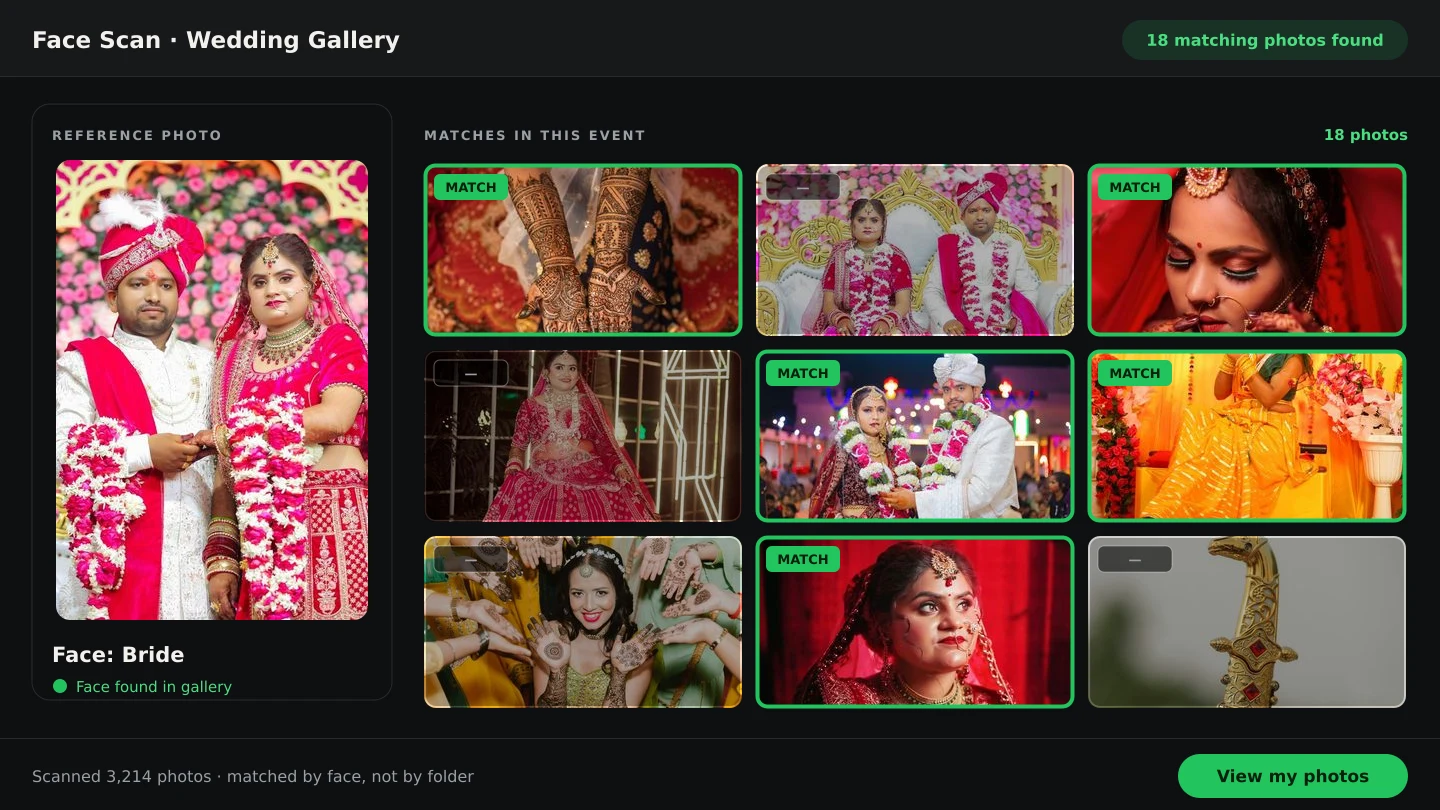
What “accuracy” is even measuring?
Three different questions hide behind the word accuracy, and they are not the same thing:
- Did the scanner see a face at all? That is face detection - whether a person is in frame, large enough and clear enough to read. A photo with no detectable face can never be matched.
- Does this photo show the person who scanned? That is face matching - comparing the guest's scan with every face found in the booking's photos. This is what decides whether a photo appears in the results.
- How clean are the results the guest sees? That is precision in practice - how many returned photos are genuinely the person, and how many are similar-looking people. Smart Photo Selection separates these by labelling weaker hits Possible match.
A single accuracy percentage would have to pick one of those questions, on a specific set of photos, with a specific definition of correct. Without saying which, the number means very little - which is why this post describes behaviour you can verify instead: see the face scan photo finder in action on your own events.
How the scan is built, and why that matters
Wedding photos show people from the front and from the side - the pheras, the stage photos, the candid profile during a toast. A single frontal snapshot as the reference misses side-angle photos, so Smart Photo Selection's scanner captures the guest in three steps: front, one side, then the other side. Each step's readings are averaged into one reference descriptor, and the booking's photos are matched against all of them. The scanner also refuses poor samples: the face must fill enough of the frame, stay stable across several readings, and not jump between looks - larger jumps usually mean movement, blur, or a different person walking past.
Face detection and the reference scan run in the guest's own browser (face-api.js); the matched photos come back per booking, so one wedding's scan never searches another wedding's gallery. Earlier scans for a booking stay listed, which is also how a photographer re-checks someone's coverage from the studio side.
What makes wedding galleries hard for face matching
- Side angles and motion. Dance floors, processions and group formations mean a large share of photos are not frontal portraits.
- Crowded frames. In a family group of fifteen, each face is small; the scanner's input resolution is tuned for that, but very small faces match less reliably.
- Lighting swings. The same person is photographed in bright haldi sunlight, warm evening light and a dark reception hall.
- Makeup, jewellery and outfits. Heavy bridal makeup, dupattas and safa styles change how a face looks between functions - multi-angle scanning exists for exactly this.
- Covered faces. Masks and dark sunglasses remove the features matching relies on; no algorithm recovers what the camera never saw.
How results are labelled in Smart Photo Selection
Rather than showing a confidence number, the results page separates the two tiers the backend distinguishes. Confident matches appear as normal results. Anything weaker is labelled Possible match, with a note on the results page: “Photos marked ‘Possible match’ may show someone who looks similar to you.” The percentage behind the label is never shown to the guest - a raw number invites false confidence, and the useful question is always “is this me?”, which only the person can answer. The results page also shows Images Checked, so it is visible how much of the gallery was actually compared against the scan.
Habits that make the most of AI face scan
- Upload the full event before sharing the link - the scan only searches what exists in the booking.
- Scan in decent light, face bare (no sunglasses, no mask), phone steady, one face in frame.
- Scan each key person separately: the bride, the groom, both sets of parents. One scan per person is the model.
- Treat a thin first result as a cue to scan again rather than as a verdict - a second scan in better light often returns more.
- Review possible matches with the guest instead of deleting them on sight; group photos often sit in that tier.
What photographers should verify themselves
The best accuracy check is your own footage. Run the face scan on a recent wedding, scan a person you know well, and look at what comes back: are their portraits there? Their candids? How many possible matches need skipping? That test, on your own mix of functions and light, tells you more about how the feature behaves at your studio than any figure quoted without a test set behind it. Photographers who want the wider comparison - scan versus manual search versus tag-based workflows - can read AI face scan vs manual wedding photo search.
AI face scanface matching for wedding photoswedding photo searchface scan accuracy
Frequently Asked Questions
Is AI face matching 100% accurate for wedding photos?
No face matching system is, and this one does not claim to be. Results are likely matches to review: confident matches are returned as normal, weaker ones are labelled Possible match, and photos with no readable face are never matched.
Does a possible match mean the scan failed?
No. It means the photo's face looked similar but below the confident tier - often a lookalike, a small face in a group, or heavy lighting. Guests review and skip those they are not in.
Why do side-angle photos still show up in results?
The guest is scanned from three angles - front, one side and the other - and the booking's photos are matched against all three references, which is what brings in ceremony and stage photos.
Can the scan find someone in photos from another event?
No. Each booking's scan searches only the photos uploaded to that booking. One wedding, one gallery, one set of results.
Is face matching available on every plan?
Face scan runs on photographer premium plans. The current plans are listed on the pricing page.
How do I get better results as a guest?
Good light, no sunglasses or mask, one face in frame and a steady phone - and a second scan if the first result looks thin. See how to create a good face reference.
Related Articles
- How AI Face Scan Helps You Find Wedding Photos FasterAI face scan helps wedding guests find their photos faster: scan your face in the phone browser and get the photos you appear in from the event gallery.
- Face Scan: Find Any Person's Photos in an Event GalleryHow a face scan photo finder works: a guest scans their face in the phone browser and sees only the event photos they appear in, with no app and no account.
- AI Face Scan vs Manual Wedding Photo Search: A Better Photography WorkflowA clear comparison of AI face scan and manual wedding photo search: speed, coverage, privacy and where each belongs in a photography workflow.
- Stop Hunting for Guest Photos: How Face Scan Technology Is Changing Indian WeddingsFind guest photos at Indian weddings fast: a face scan photo finder lets every guest pull their own event photos by face search - no app, no scrolling.
- How to Find Bride and Groom Photos FasterPractical ways to locate bride and groom photos across a wedding gallery of thousands: folder structure, selection marks and face-based search.
Step-by-Step Guides
- How to Capture a Good Face Reference for a ScanGet a face scan that matches: how to position, light and hold the phone so Smart Photo Selection captures a clear reference of a guest's face.
- How to Find Photos With Face ScanSet up and use Face Scan in Smart Photo Selection: share the gallery link or QR code, let a guest scan their face in the browser and show the photos they appear in.
Related Features
Design Your Next Album in Smart Photo Selection
Generate spreads from a booking's photos, refine them in the layer-based editor and export print-ready files.