Face Scan
How AI Face Scan Helps You Find Wedding Photos Faster
A wedding gallery answers everyone's first question badly: it shows three thousand photos and lets each guest scroll. AI face scan reverses that. The guest scans their face once in the phone's browser, and the photos they appear in come back to them - across every folder of the wedding, without anyone sorting pictures by hand. This post explains how the scan works, where it fits in a wedding photography workflow, and what it does and does not promise.
By Bhanwar Lal Kumawat · Founder & Full-Stack DeveloperUpdated 5 min readIn Face Scan
The question every wedding gallery has to answer
Every wedding ends the same way for the guest: “Where are my photos?” Aunts want the family portraits, friends want the candids from the dance floor, and the couple's parents want everything from the ceremony. Today the photographer answers that question manually - scrolling folders, picking frames, sending links - or hands out one gallery link and hopes each guest has the patience to browse it. An AI face scan changes who does the searching: instead of a person browsing photos, the gallery returns the photos of that person.
What AI face scan does
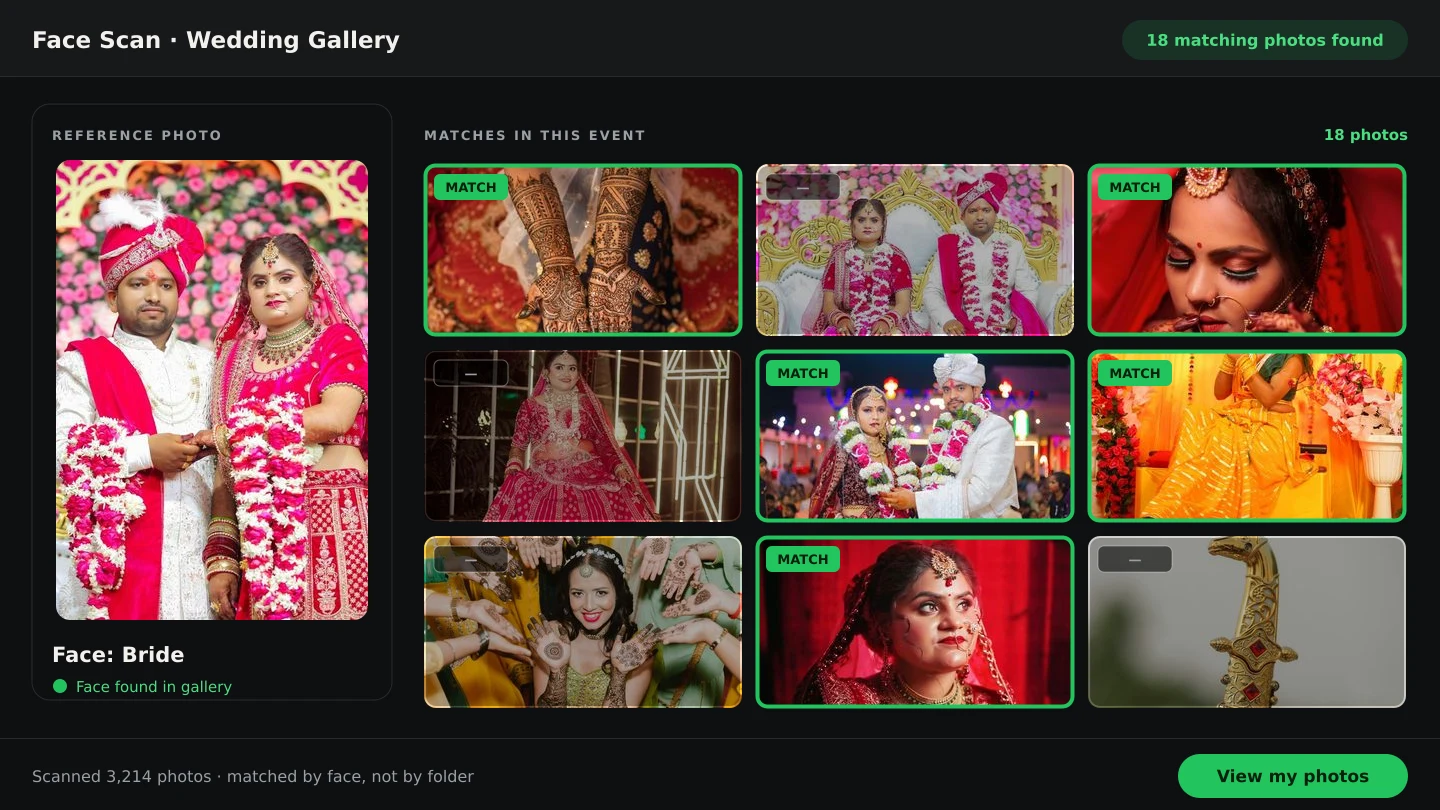
In Smart Photo Selection, a guest opens the wedding's gallery link or scans its booking QR code, taps Scan, and looks at the phone camera. Face detection runs in the browser - no app to install, no account to create - and the scan is matched against the photos uploaded for that booking only. The photos the guest appears in open on a results page: Scanned By, Images Checked and Matches Found, with the matched photos in a grid that loads more as they scroll. The search is AI-powered face matching for wedding photos: every folder of the event is checked at once, including the candids nobody thinks to ask for.
How a guest finds their photos, step by step
- 1
Open the wedding's link or QR
The photographer shares one gallery link per booking - sent on WhatsApp, printed as a QR code at the venue, or both. It opens straight in the phone's browser.
- 2
Scan the face
The scanner guides the guest through a short multi-angle capture - front, one side, then the other - so side-angle photos from the ceremony match too. It runs right there on the phone.
- 3
The booking's photos are matched
The scan is compared against the photos uploaded for that wedding. Photos still being processed are counted separately, so guests know the gallery is still catching up.
- 4
Review the matches
The results page lists the photos the guest appears in. Lower-confidence hits are labelled Possible match so similar-looking people are easy to spot and skip.
Why it is faster than scrolling, for everyone
- The effort stops scaling with the gallery. Scrolling gets slower with every thousand photos; a scan takes the same short capture whether the wedding has 800 photos or 8,000.
- Candids surface. Guests find themselves in photos they never knew existed - the shots from dinner, the corridor group, the last song.
- No queue of messages. Photographers stop receiving “send me the photos I'm in” one guest at a time for two weeks after the wedding.
- Relatives who are not techy can use it. If a guest can take a selfie, they can scan. There is no gallery navigation, no login and no folder to understand.
- It works the morning after. The scan link or QR works during the event and long after it, whenever a guest remembers to ask for their photos.
Where it fits in the photography workflow
Face scan is not a separate system - it runs on the photos you already uploaded to the booking. You upload the wedding into folders, cull it, and share one photo gallery: the couple marks favourites for the album while guests use the scan to find their own pictures from the same set. Because everything reads one booking, there is no second upload and no separate guest library to maintain. The wider sequence - upload, select, scan, deliver, album - is laid out on the photography workflow page, and event photography workflows use the same loop at larger guest counts.
What AI face scan does not do
- It does not guarantee every photo. Matching is AI-powered; results are likely matches to review, not a certainty. Photos with a weaker match are labelled Possible match for exactly that reason.
- It searches one booking, not your whole archive. Only photos uploaded to that wedding are matched, so the upload has to happen before the link goes out.
- It does not replace the client's selection. The couple still chooses favourites in the gallery; the scan is for guests finding themselves.
- It runs on photographer premium plans. On a booking without an active premium plan, the scan page shows that scanning is unavailable.
- Heavy disguise still hides faces. Masks, dark sunglasses and strongly backlit profiles reduce matches; a second scan in better light is the fix.
What photographers get out of it
Offering an AI face scan turns the most repetitive part of post-wedding work - sorting photos per attendee - into something guests do themselves. One QR code at the venue serves the whole guest list; the same gallery still carries your studio name, Instagram link and phone number, so every scan keeps your studio in front of the family. And because the results live in the booking, anyone checking a guest's coverage - a second shooter verifying the bride's portraits, for example - can scan too. See face scan vs manual search for the honest comparison, including when browsing is still the better tool.
AI face scanwedding photo searchface matching for wedding photosevent photo sharing
Frequently Asked Questions
Do wedding guests need an app or an account for AI face scan?
Neither. They open the wedding's gallery link or scan its QR code, allow the camera, and the scan runs in the phone's web browser.
Which photos does a guest get back?
The photos they appear in, from the photos uploaded to that wedding's booking - across every folder, including group shots and candids.
How accurate is AI face matching for wedding photos?
Matching is AI-powered and results are likely matches to review, not a guarantee. Weaker matches are labelled Possible match so guests can skip lookalikes. See how accurate AI face matching is for a longer answer.
Does the photographer have to sort photos for each guest first?
No. The scan searches the booking's photos directly - the same photos used for client selection - so there is no per-guest sorting step.
Is face scan included in every plan?
Face scan runs on photographer premium plans. See the pricing page for the current plans.
Can a guest find photos from more than one wedding?
Each booking has its own gallery and scan, so a guest scans once per event. Earlier scans stay listed for that booking on the same device.
Related Articles
- Face Scan: Find Any Person's Photos in an Event GalleryHow a face scan photo finder works: a guest scans their face in the phone browser and sees only the event photos they appear in, with no app and no account.
- AI Face Scan vs Manual Wedding Photo Search: A Better Photography WorkflowA clear comparison of AI face scan and manual wedding photo search: speed, coverage, privacy and where each belongs in a photography workflow.
- How Accurate Is AI Face Matching for Wedding Photography?What AI face matching for wedding photos really measures, why results arrive as strong or possible matches, and the habits that make an AI face scan most reliable.
- How Photographers Can Share Event Photos Using Booking QR CodesGenerate a booking QR code for a photography event, print or send it, and guests scan it with any phone camera to open the gallery. See a real sample.
- How to Find Bride and Groom Photos FasterPractical ways to locate bride and groom photos across a wedding gallery of thousands: folder structure, selection marks and face-based search.
Step-by-Step Guides
- How to Find Photos With Face ScanSet up and use Face Scan in Smart Photo Selection: share the gallery link or QR code, let a guest scan their face in the browser and show the photos they appear in.
- How to Capture a Good Face Reference for a ScanGet a face scan that matches: how to position, light and hold the phone so Smart Photo Selection captures a clear reference of a guest's face.
- How to Manage and Deliver Photo GalleriesRun a booking's gallery end to end: downloads, private mode, sharing by link or QR, ZIP delivery of the selected set and the photo period that governs expiry.
Related Features
Design Your Next Album in Smart Photo Selection
Generate spreads from a booking's photos, refine them in the layer-based editor and export print-ready files.