
Smart Photo SelectionSmart Photo Selection
    HomeRent Houses & Photo StudiosEvent Items
    Smart Photo SelectionSmart Photo Selection
    Sign In
    Smart Photo SelectionSmart Photo Selection

    Built with ❤️ for memorable celebrations. Smart Photo Selection — AI photo selection for photographers.

    Terms & Conditions•Privacy Policy•Cancellations & Refunds•Shipping Policy•Contact Us

    © 2026 Smart Photo Selection. All rights reserved.

    Skip to content
    Smart Photo SelectionSmart Photo Selection
    • Photo Selection
    • Face Scan
    • Templates
    • For Photographers
    LoginGet Started
    1. Home
    2. Face Search

    Find photos by face

    Face Search for Event Photos: Find Anyone in Seconds

    Face search answers “where am I in these photos?” without scrolling. In Smart Photo Selection a guest scans their face with their phone camera right in the browser, and the event gallery returns the photos they appear in. No app, no guest account — one scan link or QR code per event, searching the photos you already uploaded.
    Get Started
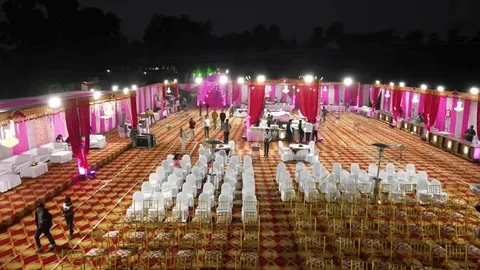
    Evening reception venue with guests and lights

    Find Your Photos

    Look at the camera

    Guest looking at the camera for a face scanFace found

    Works in the browser · no app

    Scan complete

    Your photos are ready

    Match
    Match
    Match

    How it works

    From a Face to Its Photos

    Face Scan · Wedding Gallery18 matching photos found

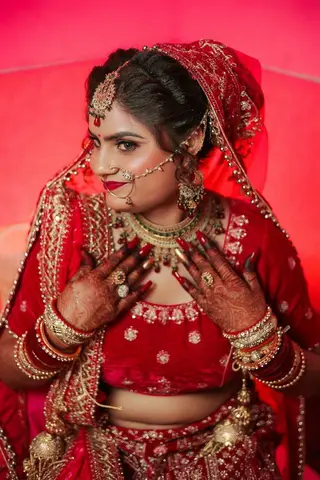
    REFERENCE PHOTO

    Reference portrait of the bride used for the face scan

    Face: Bride

    Face found in gallery

    MATCHES IN THIS EVENT18 photos
    MATCH
    —
    MATCH
    —
    MATCH
    MATCH
    —
    MATCH
    —
    Scanned 3,214 photos · matched by face, not by folderView my photos
    1. 01

      Upload the event

      The shoot goes into the booking as usual. Face search reads those same photos — there is never a second upload.

    2. 02

      Share the scan link or QR

      Each booking has its own face-scan link and QR code: send it on WhatsApp, show it on screen, or print it at the venue.

    3. 03

      Guest scans their face

      A quick camera scan in the phone's web browser. Matching runs right there in the browser.

    4. 04

      Matched photos appear

      The guest gets the event photos they appear in, on a results page they can return to and share.

    Guests

    Why Guests Actually Use It

    • No scrolling thousands of photos

      A 3,000-photo wedding gallery becomes a personal set in one scan.

    • Nothing to install

      Browser, camera, done. Guests who would never download “one more app” still participate.

    • Nobody to wait for

      No messages to the photographer, no days of waiting for someone to sort manually.

    • Shareable results

      The results page can be revisited and shared, so the photos keep travelling.

    Photographers

    What Face Search Gives the Studio

    • The request queue disappears

      “Send me my photos” stops arriving one guest at a time, because every guest can self-serve.

    • Coverage you can check

      Scan a face yourself to confirm key people are well covered before delivery. New to the flow? Start with the face scan photo finder.

    • Works on event scale

      Receptions, corporate events, parties — anywhere the guest count makes manual sorting hopeless.

    • Studio stays visible

      Your name, Instagram and number sit on the gallery every guest opens.

    • Part of premium plans

      Face search runs on photographer premium plans, per booking.

    Compared

    Face Search vs Scrolling, Tags and Requests

    The alternatives all scale badly. Scrolling fails past a few hundred photos; manual tagging fails past a few dozen guests; fulfilling requests fails the photographer's entire week. Searching by face is the only option whose effort stays flat as guest count grows — one scan per person, however large the event.

    • Vs the full gallery

      Browsing asks every guest to review every photo. Search asks each guest for one scan.

    • Vs manual face tagging

      Tagging thousands of photos by hand is a second shoot's worth of work. Scanning skips it entirely.

    • Vs “send me my photos”

      Requests arrive for weeks and each takes minutes. A QR code at the venue answers them all at once.

    Accuracy

    Getting Matches You Can Trust

    Matching runs in the browser against the event's photos. Two habits keep results clean: scan with one face clearly visible, and search galleries where the event photos are already uploaded in full — the scan reads what is there, so coverage follows upload quality.

    The scanner finds people in event photos; it does not digitise printed photographs or documents. Guests sit still, face the camera, and hold the phone steady for the reference scan.

    FAQ

    Common Questions

    What is face search in photography?

    A way to find photos by face instead of scrolling: a guest scans their face and gets the event photos they appear in.

    How does face search find my photos?

    Open the event's scan link or QR code, scan your face with the phone camera in the browser, and the gallery returns your matched photos on a results page.

    Do guests need an app or account?

    No. Everything runs in the phone's web browser from the booking's link or QR code.

    Does face search need a separate upload?

    No. It searches the photos already uploaded for the event — the same ones used for client selection.

    Is this for scanning old printed photos?

    No. It finds a living person's face within an event's digital photos; it does not digitise prints or documents.

    Which events suit face search?

    Weddings, receptions, parties and corporate events — anywhere many guests share one large gallery.

    Is face search included in every plan?

    Face search runs on photographer premium plans, per booking.

    Explore the Rest of the Workflow

    • Face Scan Photo FinderGuests find their own photos with an in-browser face scan.
    • Photo Gallery & DeliveryShare an online client gallery by link or QR code and deliver.
    • Photo SelectionCull the shoot, let clients select online, deliver the approved set.
    • Event PhotographyEvent photo selection with organisers and a QR photo finder.
    • Wedding Photography WorkflowSelection, culling, sharing and delivery for wedding shoots.
    • Photography WorkflowHow upload, selection, face scan and delivery fit together.

    Let Every Guest Find Themselves

    Share one scan link per event and stop sorting guest photos by hand.

    Get Started
    Smart Photo SelectionSmart Photo Selection

    AI photo selection, face scan photo finding, online galleries and AI wedding albums for photographers, plus tent house and event item rentals.

    • WhatsApp
    • +91 63767 36945
    • [email protected]

    Album Studio

    • AI Album Generator
    • Professional Album Editor
    • Wedding Album Templates
    • PSD Album Automation
    • Wedding Album PSD
    • Double Exposure Albums
    • Photo Editor

    Photography

    • Photo Selection Software
    • Photo Selection
    • AI Photo Selection
    • Client Photo Selection
    • Face Scan Photo Finder
    • Face Search
    • Photo Gallery & Delivery
    • Bulk Photo Upload
    • Wedding Photography
    • Event Photography
    • Photography Workflow

    Event Rentals

    • Rent Houses
    • Browse Tent Houses
    • Event Items

    Resources

    • How It Works
    • Guides
    • Blog
    • 12 × 36 Wedding Album
    • 12 × 30 Wedding Album
    • 14 × 40 Wedding Album
    • For Photographers
    • FAQ
    • About
    • Contact
    Smart Photo Selection

    © 2026 Smart Photo Selection. All rights reserved.

    • Privacy Policy
    • Terms & Conditions
    • Cancellations & Refunds
    • Shipping Policy