Wedding Album Design
Indian Wedding Album Design Ideas: Haldi, Mehndi, Sangeet, Wedding and Reception
An Indian wedding is several events, each with its own colours, light and emotion, and often thousands of photos. A good album treats each function as a chapter with its own visual identity while still feeling like one book. These are practical design ideas for every function, plus how to pace the album so it never feels like a photo dump.
By Smart Photo Selection TeamUpdated 5 min readIn Wedding Album Design
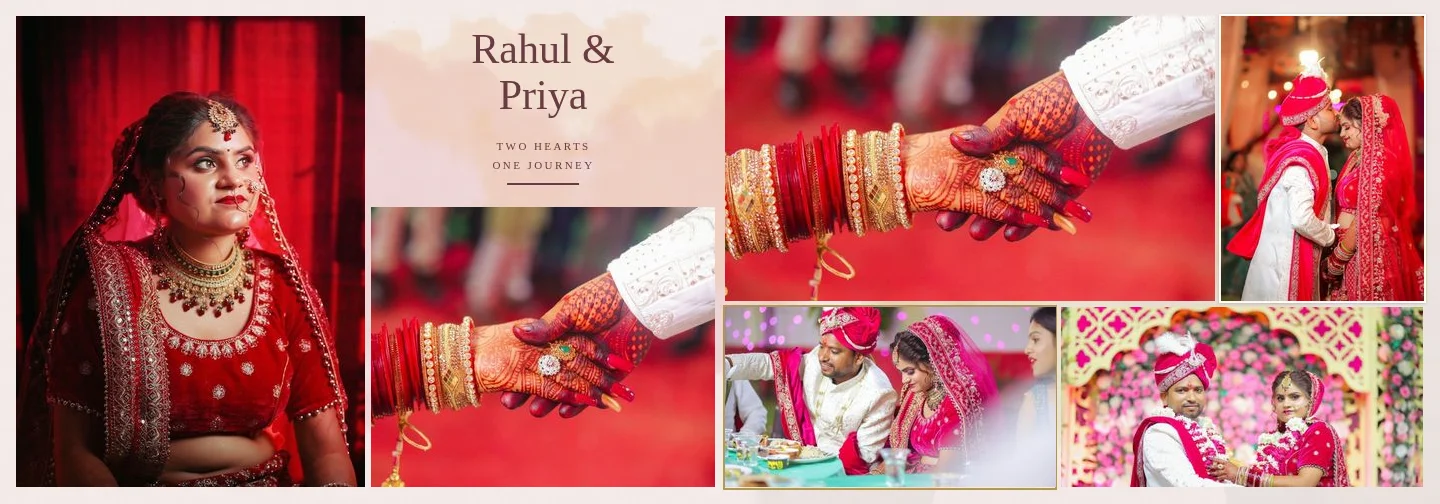
Plan the album as chapters
Start with a chapter plan before you place a single photo. List the functions in order, decide roughly how many spreads each gets, and pick the opening spread for each. A typical plan might be: opening, haldi, mehndi, sangeet, baraat, wedding ceremony, vidaai, reception, closing. The ceremony usually gets the most spreads; haldi and mehndi fewer; the reception enough for portraits and family.
Keep one visual family per chapter: the same paper colour, similar frames and a consistent grade. Change the family when the function changes. The reader then feels the chapter break on the page turn, even without a title.
Haldi
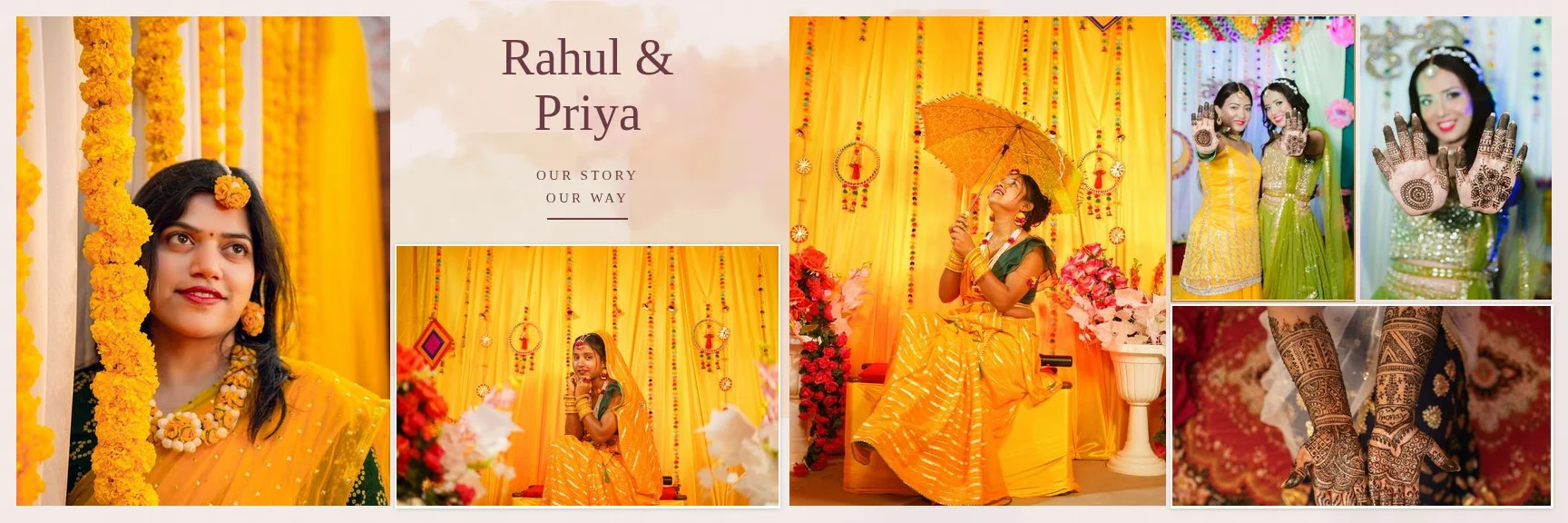
Haldi is bright, messy and joyful. Yellow outfits, marigolds and turmeric dominate, often in harsh daylight.
- Palette: warm ivory or blush paper; avoid pure white, which makes yellow look dirty.
- Layout: dense spreads of 8 to 10 photos for the candid chaos, then one calmer spread with a large portrait of the bride or groom.
- Hero: a laughing close-up with haldi on the face, not the widest group shot.
- Watch out: yellow casts on skin. Correct white balance before export so skin does not turn orange.
Mehndi
Mehndi is slower and more detailed: hands, patterns, close conversations, music.
- Palette: soft greens and pinks work well; Floral and Light Elegant templates suit daytime mehndi.
- Layout: pair one large detail of finished mehndi with smaller frames of the process and the people.
- Exposure idea: a hand close-up fading into a wide shot of the gathering. See double exposure ideas.
- Watch out: many near-identical hand shots. Choose the best two; the rest belong in the gallery, not the album.
Sangeet
Sangeet is an evening event: stage lights, dance performances, motion blur and coloured light.
- Palette: dark pages make stage light glow. Dark Cinematic templates are designed for this.
- Layout: sequences of a performance read well as a row of three or four frames left to right, with the couple's reaction as the hero on the facing page.
- Watch out: mixed light sources. Keep skin tones consistent even when the stage colours change; grade the skin, not the lights.
Baraat and arrival
- Energy first: dhol, dancing, the groom on a horse or in a car. Use full-bleed or large frames for movement.
- Hero: the groom's expression, ideally a calm moment amid the noise.
- Pacing: one or two spreads is usually enough; the ceremony needs the space.
Wedding ceremony: varmala, pheras, sindoor, mangalsutra
The ceremony is the heart of the album and the place where documentary clarity matters most. Every ritual should be recognisable.
- Varmala: one wide frame showing both families, plus a close-up of the exchange.
- Pheras: a Storytelling layout of several rounds, in order, with the fire as a recurring element.
- Sindoor and mangalsutra: these are the emotional peak. Give them a calm spread with few photos, so each has room.
- Family: parents' reactions next to the ritual they are reacting to.
- Watch out: faces near the centre fold. Ceremony photos are often wide and centred; keep the couple on one page. Read bleed, safe area and the centre fold.
Vidaai
Vidaai is quiet and emotional. Resist the urge to fill the page. A sparse spread with a single strong frame and two or three supporting photos says more than ten crying faces. Desaturated or softer grading can help, but keep it consistent with the rest of the ceremony chapter.
Reception
- Portraits: reception outfits deserve formal couple portraits; this is a good place for a Luxury spread with matted frames.
- Family groups: use plain frames, never exposures, so every face stays visible.
- Stage and décor: one spread for the setting, with a wide shot and details.
- Closing: end the album with a quiet couple moment, or an exposure spread that mirrors the opening.
Pacing an album of many functions
Indian albums can run long. Alternating density is the most effective way to keep them readable: follow a busy ten-photo spread with a five- or six-photo spread, and open each chapter with a sparse, strong design. For photo counts per spread, see how many photos per spread. For the choice between the two most common sizes, read 12 × 36 vs 14 × 40.
Designing it in Smart Photo Selection
Smart Photo Selection's Indian Wedding templates use warm ivory and blush papers with rose, peach and sand washes, double-line and matted frames, and portrait exposure areas. They hold 5 to 10 photos and are laid out for 12 × 36, 14 × 40 and custom sizes. You can mix them with other styles per chapter, for example Dark Cinematic for the sangeet.
The AI album generator can also design a chapter at a time: select a function's photos, generate, review and regenerate sheets you want to change. For the full workflow and what the AI does and does not decide, see AI wedding album design: the complete guide.
Indian wedding albumhaldimehndisangeetreception
Frequently Asked Questions
How many spreads does an Indian wedding album usually have?
It varies widely with the number of functions and the package. Plan spreads per function first; the ceremony usually needs the most.
Should each function have its own style?
A consistent style within each function and a deliberate change between functions usually reads best. Too many styles in one chapter feels random.
How do I handle very colourful outfits?
Choose papers that complement rather than compete (warm ivory for yellow and red, dark pages for stage lights), and correct skin tones before grading the rest.
Can I add event titles like “Haldi” or “Sangeet”?
Yes. Add text layers in the editor; many templates already include typography. Text is kept off the centre fold like photos.
Related Articles
- AI Wedding Album Design: The Complete GuideHow AI wedding album design works, what it does well, where you still decide, and a practical workflow from photo selection to print-ready export.
- Double Exposure Wedding Album Ideas That Actually WorkTen double exposure pairings for wedding album spreads, how to choose photos that blend well, where to place them in the album and when to avoid the effect.
- 12 × 36 vs 14 × 40 Wedding Album: Which Size Should You Offer?12x36 vs 14x40 wedding albums compared: page size, ratio, pixels at 300 DPI, photo resolution needed and which layouts and clients each size suits best.
Step-by-Step Guides
- How to Create a Wedding Album With AIStep-by-step: pick a booking, run the AI photo selection, choose a size and design style, generate the spreads, then review and export your wedding album.
- How to Arrange 7 Photos on a Wedding Album SpreadThree ways to split seven photos across a spread (3 + 4, 4 + 3 and 5 + 2), when to use each, and how to pick or generate a 7-photo layout in Smart Photo Selection.
- How to Keep Faces Off the Centre Fold of an AlbumWhy faces disappear into the binding, how Smart Photo Selection keeps photos and text off the centre fold, and how to check and fix spreads before you export them.
Related Features
Design Your Next Album in Smart Photo Selection
Generate spreads from a booking's photos, refine them in the layer-based editor and export print-ready files.