Face Scan
Stop Hunting for Guest Photos: How Face Scan Technology Is Changing Indian Weddings
An Indian wedding means four functions, a thousand guests and forty thousand photos — and then every family asks “where are our photos?” Face scan technology ends that hunt: each guest scans their own face on their phone and gets the event photos they appear in, while the photographer never hand-sorts a single frame. Here is how it works at real Indian weddings and what changes for studios that offer it.
By Smart Photo Selection TeamUpdated 4 min readIn Face Scan
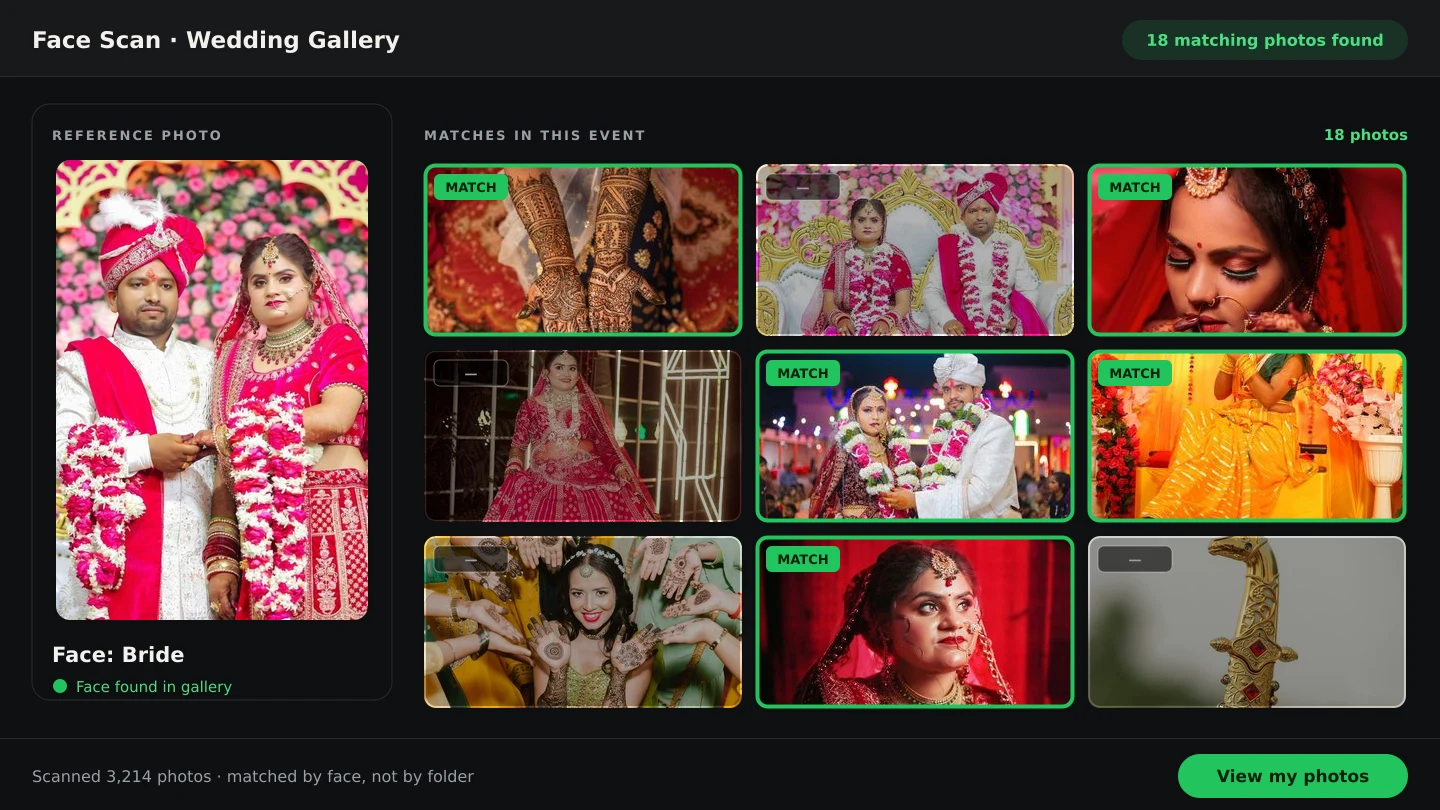
The guest-photo problem at Indian weddings
A typical Indian wedding runs haldi, mehndi, sangeet, wedding and reception across several days, shot by teams producing tens of thousands of frames with 500–2,000 guests in them. After delivery, the photographer's phone fills with the same request from every direction: the chacha who wants his family's photos, the bride's college friends, the groom's office group. Finding one person's photos in that haystack used to mean hours of manual scrolling — per request, unpaid, weeks after the event.
A face scan photo finder reverses the work. Instead of the photographer searching the gallery for the person, the gallery returns the photos of the person. Each booking gets its own scan link and QR code; a guest opens it, scans their face with the phone camera in the browser, and lands on the event photos they appear in. No app, no guest account. The mechanics are explained in Face Scan: find any person's photos.
How it works on the wedding day
- 1
Upload the event photos
Photos go into the booking's gallery as usual, organised by function. The same upload that feeds photo selection feeds the scan — nothing is uploaded twice.
- 2
Share the scan link and QR
Send the link on the family WhatsApp groups, show the QR on screen at the venue, or print it at the photo booth. One link covers the whole event.
- 3
Guests scan their own face
Each guest scans themselves with their phone camera, in the browser. There is deliberately no search-by-uploading-someone-else's-photo: a person can only find their own pictures.
- 4
Matches open as their gallery
The guest gets the event photos they appear in, ready to view and (if you allow it) download. Matching is AI-powered: results are likely matches to review, not a guarantee.
What changes for each person at the wedding
| Role | Before | After |
|---|---|---|
| Guests and family | Message the photographer; wait weeks; receive a mixed folder | Scan once; get their own photos the same week |
| The couple | Forward requests; mediate family photo politics | Share one link; everyone's request answers itself |
| The photographer | Unpaid hand-sorting for every attendee who asks | Zero sorting; the gallery does it per guest |
Where it fits in an event photographer's workflow
Alongside selection, not instead of it
The couple still chooses the album set through the wedding client gallery; guests use face scan on the same booking in parallel. The two never interfere: proofing stays private to the decision-makers while a thousand guests self-serve. Our manual search vs face scan comparison measures the difference.
At multi-day, multi-photographer events
Second shooters, drone teams and candid crews all upload into the same booking folders, so a guest's scan searches across every camera at once — something no manual sorting can match. For the organiser's side, see event photography software.
As a premium studio offering
“Every guest gets their photos in a week, found by face” is a line competitors without the technology cannot match. Face scan is part of photographer premium plans — position it in packages, print the QR at the venue, and let guests experience the studio's technology firsthand.
Finding specific people faster as the photographer
The same technology helps inside the studio: checking that the bride and groom are well covered before delivery, or pulling every frame of the couple for the album shortlist. See find bride and groom photos faster for the working method.
face scan photo finderface search event photosfind guest photosIndian weddings
Frequently Asked Questions
How do wedding guests use face scan?
They open the booking's scan link or QR on their phone, scan their own face with the camera in the browser, and get the event photos they appear in. No app install and no account needed.
Can someone find another person's photos with face scan?
No. The scan uses the live phone camera, so a guest can only match their own face — there is no uploading someone else's photo to search with.
How accurate is face search on wedding photos?
Matching is AI-powered across varied lighting, angles, makeup and traditional outfits. Treat results as likely matches to review: guests get their photos in seconds, and edge cases can be checked in the full gallery.
Does face scan work across haldi, mehndi, wedding and reception?
Yes — the scan searches every photo in the booking, so one scan returns a guest's photos from all functions and all photographers' cameras at once.
Is face scan included for every photographer?
Face scan is part of photographer premium plans. The couple's gallery selection works on all plans; check current plan details before promising guest scan to clients.
Related Articles
- Face Scan: Find Any Person's Photos in an Event GalleryHow a face scan photo finder works: a guest scans their face in the phone browser and sees only the event photos they appear in, with no app and no account.
- Face Scan vs Manual Photo Search: What Helps GuestsA clear comparison of face scan photo finding and manual gallery search: speed, coverage, privacy and what each approach means for photographers.
- How to Find Bride and Groom Photos FasterPractical ways to locate bride and groom photos across a wedding gallery of thousands: folder structure, selection marks and face-based search.
Step-by-Step Guides
- How to Find Photos With Face ScanSet up and use Face Scan in Smart Photo Selection: share the gallery link or QR code, let a guest scan their face in the browser and show the photos they appear in.
- How to Capture a Good Face Reference for a ScanGet a face scan that matches: how to position, light and hold the phone so Smart Photo Selection captures a clear reference of the guest's face in the browser camera.
- How to Manage and Deliver Photo GalleriesRun a booking's gallery end to end: downloads, private mode, sharing by link or QR, ZIP delivery of the selected set and the photo period that governs expiry.
Related Features
Design Your Next Album in Smart Photo Selection
Generate spreads from a booking's photos, refine them in the layer-based editor and export print-ready files.