Photo Selection
Photo Selection vs Photo Culling: What's the Difference?
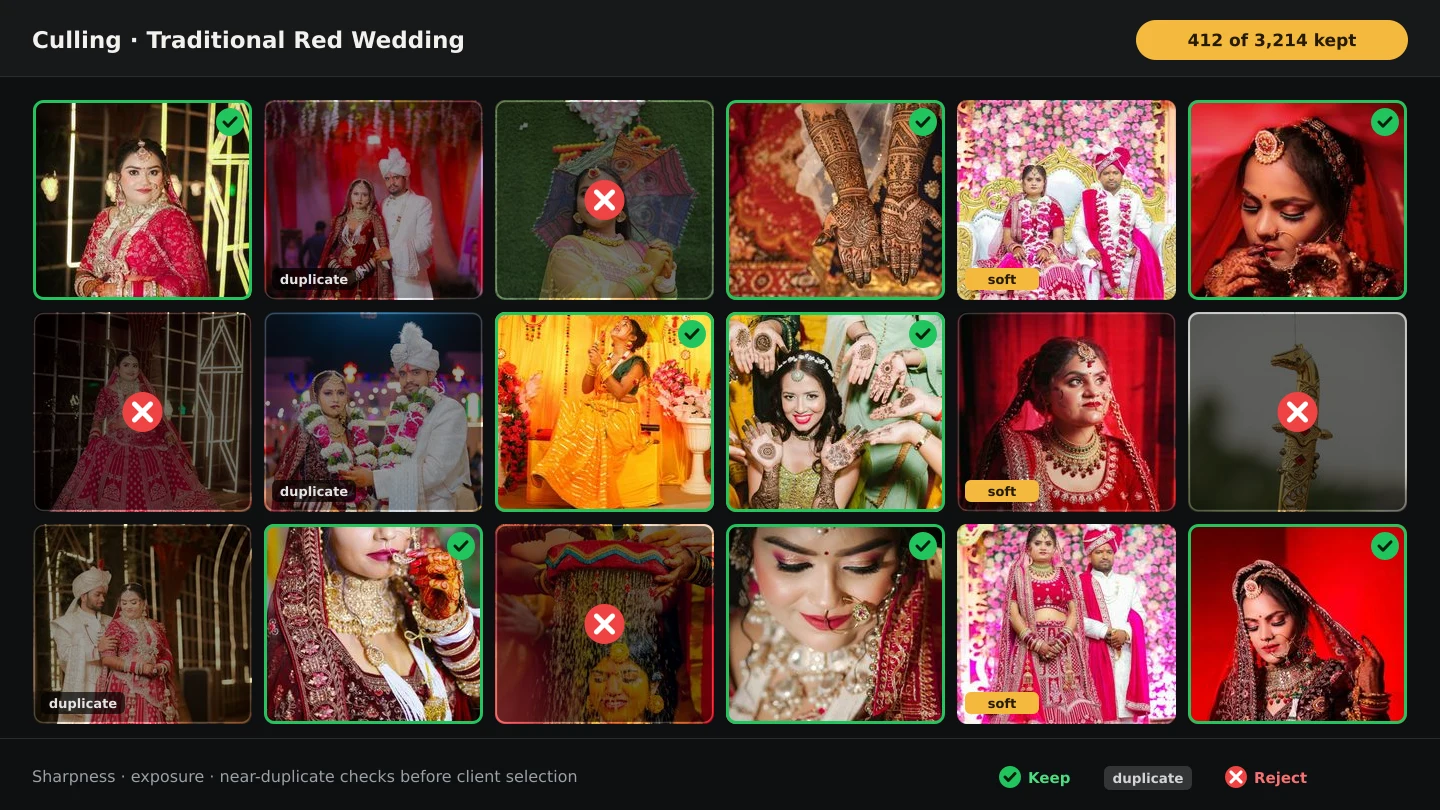
Photographers use 'culling' and 'selection' almost interchangeably, but they are different steps owned by different people. Culling is the photographer deleting what should never reach the client; selection is the client choosing what moves forward. Mix up the order and clients lose confidence; get it right and each step makes the next one shorter.
By Smart Photo Selection TeamUpdated 3 min readIn Photo Selection
Definitions that stay put
| Culling | Selection | |
|---|---|---|
| Who decides | The photographer | The client |
| Where it happens | On the photographer's computer or in a first-pass view | In a shared online gallery |
| Input | The full raw shoot | The culled keepers |
| Output | A clean set worth showing | A locked, approved set worth editing |
| Wrong order costs | Clients see rejects and stop trusting the gallery | Editing and albums start from guesses |
What culling actually removes
- Technically unusable: missed focus, motion blur that wasn't intended, badly blown exposures.
- Accidental: test frames, light checks, frames shot while moving between positions.
- Redundant: burst twins and near-duplicates where only the strongest should survive.
- Off-brief: anything the client explicitly excluded — phone screens, staff-only moments, restricted areas.
AI assistance earns its place here: a ranking pass that scores sharpness, exposure, faces and near-duplicates surfaces exactly these frames first, with a reason on each one. The photographer still makes every call — see AI photo selection for wedding photographers for where the scores help and where they mislead.
What selection actually records
Selection records taste, not quality: which moments the couple cares about, which frames the organiser needs, how many the album holds. In a gallery this means Selected / Not selected status on every photo, filters for either view, and a submit action that locks the set. Until that lock, everything is a draft; after it, everything downstream — edits, album, delivery — reads from one list. The mechanics are covered in the client photo selection workflow.
The order that works
- Upload organised: one booking, one folder per function or session.
- Cull privately: delete rejects — optionally after an AI ranking pass — before anything is shared.
- Share the keepers: one gallery link or QR code to the client.
- Collect the decision: client marks favourites folder by folder, checks the Selected view, submits.
- Work from the lock: download the submitted ZIP for editing, delivery or album design.
Two mistakes that cost weeks
- Sharing before culling: the client scrolls past blurry frames, concludes the shoot is weak, and either over-selects defensively or disengages. Cull first, always.
- Treating favourites as approval: a favourite list without a submit step keeps growing. The lock is what converts choosing into a decision you can schedule work around.
Where both live in one workflow
In Smart Photo Selection the two steps share a booking: rank and cull in the gallery views, share the same gallery for client proofing, and let guests pull their own photos with face scan while the client decides. The product overview is on the photo selection page.
photo selectionphoto cullingworkflowclient proofing
Frequently Asked Questions
What is the difference between culling and selection?
Culling is the photographer removing unusable frames; selection is the client choosing favourites from what remains. Culling happens first, on your side; selection happens in a shared gallery.
Can AI do the culling for me?
It can do the first pass: scoring sharpness, exposure, faces and duplicates surfaces the likely rejects. You still review and decide, especially for deliberate motion, dark scenes and meaningful quiet frames.
What happens if I skip culling and share everything?
Clients see rejects, lose confidence in the shoot, and either over-select or stall. A short private cull protects both the gallery and your reputation.
Is a favourite list the same as a selection?
No. Favourites without a submit step are a wishlist. A submitted, locked set is an approval you can schedule editing and album work around.
Related Articles
- What Is Photo Selection Software? The Complete Photographer's GuidePhoto selection software explained: online galleries, client proofing, AI shortlists and face search — what it does, who needs it and how it differs from culling.
- A Wedding Photo Culling Workflow That Keeps UpA repeatable culling workflow for wedding photographers: remove rejects, break ties between near-duplicates and hand a clean gallery to the couple.
- The Client Photo Selection Workflow, Start to FinishHow client photo selection works online: share a gallery, let the client mark favourites, lock the set on submission and download exactly what they chose.
- AI Photo Selection for Wedding PhotographersWhat AI photo selection does with sharpness, exposure, faces and duplicates, and how to use it on a wedding shoot without losing the moments that matter.
- How to Select the Best Wedding Photos FasterA practical method for choosing the best photos from a large wedding shoot: two passes, folders per function, AI help and a locked client choice.
Step-by-Step Guides
- How to Cull Photos Before SelectionCull the raw shoot in Smart Photo Selection: review folders at full size, remove blinks, blurs and test frames, and keep the client's view clean before selection.
- How to Select Photos Manually in Smart Photo SelectionChoose photos by hand in the Smart Photo Selection gallery: folder tabs, the Selected and Not Selected filters, full-size preview, Select All and saving the selection.
- How to Use AI Photo SelectionRun AI Photo Selection in Smart Photo Selection: set how many photos the album needs, rank the shoot by sharpness, exposure and faces, then adjust the shortlist by hand.
Related Features
Design Your Next Album in Smart Photo Selection
Generate spreads from a booking's photos, refine them in the layer-based editor and export print-ready files.