Smart Photo Selection guide
How to Choose Photos for an Album
Pick the photos that go into the book: use client picks and folder filters in Album Studio's photo picker, and decide how many frames a sheet can hold.
By Smart Photo Selection TeamUpdated Published 4 min read
Short answer
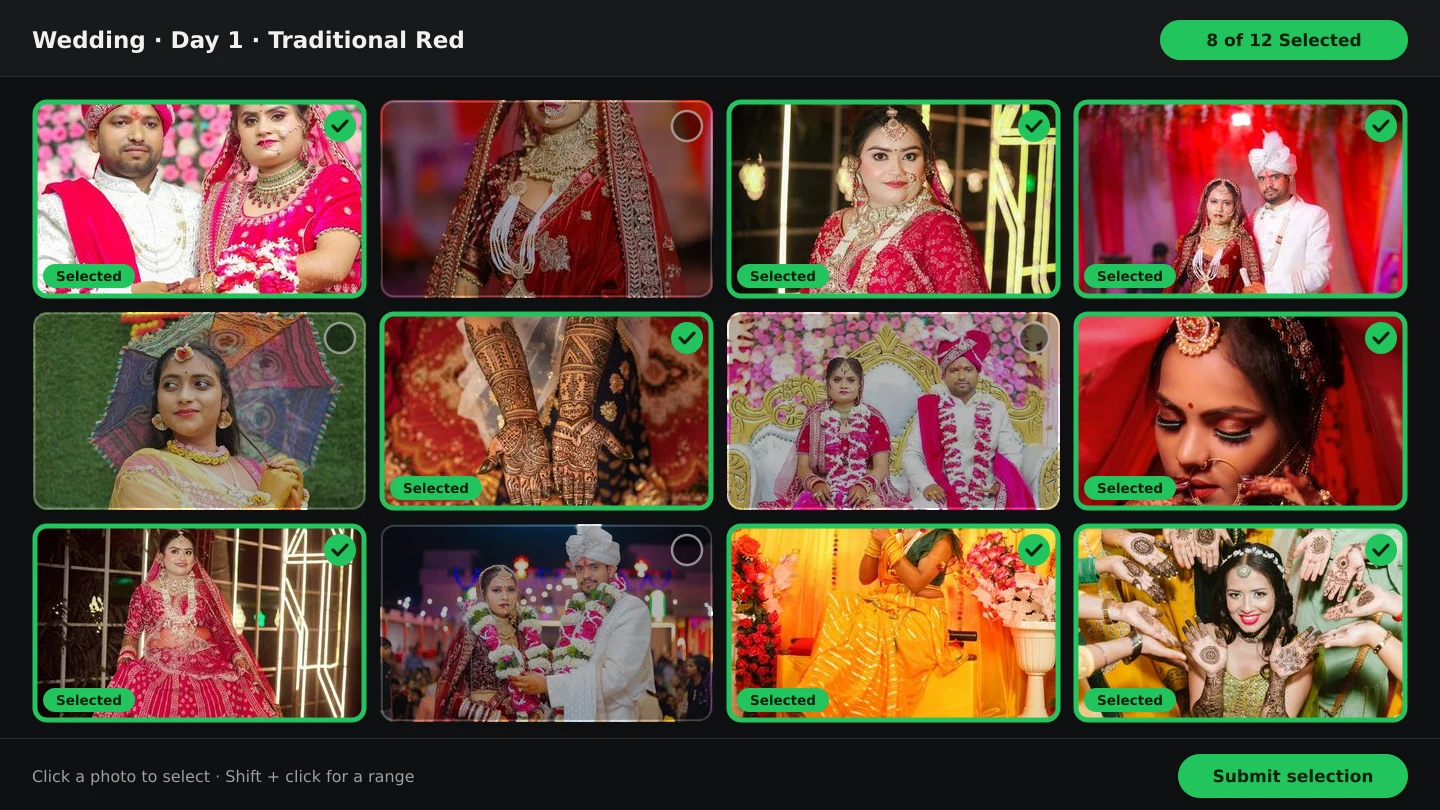
In the album's photo step, open the booking under Choose the booking whose gallery this album uses and filter with Client selection: → Selected to start from the couple's picks. Add frames with Select shown, Select all in folder or Select entire gallery, watch the N chosen for the album counter against how many sheets you plan, and press Clear to start again. The order you finish with becomes the album's story order, editable later in Sequence & album order.
What You Need
- An album project created in Album Studio (any of the three routes).
- The booking's photos uploaded, ideally with the client's selection submitted.
- Roughly how many sheets the album will have, so the photo count has a target.
This is a second, smaller cull
The gallery selection answers is this frame a keeper? The album pick answers a different question: does this moment belong in the book? Most weddings produce more good frames than a 20-spread album can hold, so this pass is about representation — every function, both families, the rituals the couple named — rather than quality. Starting from the client's picks keeps the book aligned with what they already chose, and the picker's filters make that a one-click view instead of a scroll.
Step by step: build the set
- 1
Open the picker in the album
In the AI flow this is
Photos for the AI album; in the automatic flow it is1. Booking gallery. The picker has three tabs:Album photos (N)(what the project already holds),Booking galleryandFrom computer. - 2
Start from the client's picks
Use the
Client selection:filter —All,Selected (N),Not Selected (N). WithSelectedactive the hint reads Photos your client picked — choose the ones for this album (e.g. 7–8 for a sheet), and each of those frames carries aClient pickbadge. - 3
Add photos in bulk or one by one
Click a photo to stage it.
Select showntakes everything visible,Select all in foldertakes the current folder, andSelect entire gallerytakes the whole booking (a toast reports N photos selected from the whole booking).Clearresets the staging. - 4
Find strays with search and sort
The search box (
Search filename or number…) needs the whole gallery loaded — it loads automatically while you type. Sort bySequenceto work in shooting order, orFilename,Newest uploadandOldest uploadwhen you are looking for a specific frame. - 5
Watch the count
The line under the toolbar reads
N chosen for the albumplus M of N loaded in folder. Confirm withAdd N Photos(orAdd Selected Photos); the dialog footer shows the same count before you commit. - 6
Set the order
In the automatic flow the side panel
Sequence & album orderappears as soon as photos are chosen: reorder there, and the mapping step fills slots in exactly that order.
How many photos is enough
- Multiply planned sheets by your usual density: sheets × photos per sheet. Twenty sheets at seven photos is about 140 frames.
- Count functions first: give the ceremony its share before filling the rest with portraits.
- Prefer one strong frame per moment over three near-identical ones — duplicates consume slots without adding story.
- If the set is larger than the album holds, the automatic flow warns you and offers
Repeat the design (N sheets)orUse only the first N photos; both are better than cramming.
Tips
- Filter to
Selectedfirst and choose from there — the couple's picks are the shortest route to a book they recognise. - Sort by
Sequencebefore bulk-selecting, so the default order already reads like the day. - Keep a small overflow list: frames you like but could drop, for when a sheet needs one more photo.
- Upload a couple of your own frames with
From computerwhen a key shot lives outside the booking.
Common Mistakes
Choosing the whole gallery
Select entire gallerygives the generator or mapper far more frames than sheets can hold, so good photos lose slots to filler. Pick deliberately.Ignoring the client's `Client pick` badges
Those frames are already agreed keepers. Build the book around them, then add what they missed.
Deciding the count after generating
Sheet count comes from photos and density. Set the target first — see how many photos per spread.
Leaving the order accidental
Fix it in
Sequence & album orderbefore mapping: slot 01, 02 and so on follow that order exactly.
Frequently Asked Questions
Can I change the album's photos after mapping?
Yes. Adding or removing photos makes the mapping stale, and the step offers Rebuild mapping to place everything again in the current order.
What if the couple picked more photos than fit?
Either add sheets or trim the set. The overflow prompt (Repeat the design / Use only the first N photos) exists because squeezing photos in is what makes albums feel crowded.
Do Face Scan and selection use this album set?
No. The gallery selection and Face Scan work on the booking; this set only decides what goes into the book.
Where do I add photos I shot after the gallery closed?
Use the From computer tab — they are uploaded for this album only, and appear under Uploaded for this album.
Related Guides
- How to Send Photos to Clients for SelectionHand a gallery to the couple for photo selection: share the link or QR, let them mark frames with Done, then submit so the agreed set is locked for delivery.
- How Album Automation WorksUnderstand Album Automation: booking photos are read in sequence and mapped into the verified slots of your PSD design, sheet by sheet, for export.
- How to Use AI Photo SelectionRun AI Photo Selection in Smart Photo Selection: set how many photos the album needs, rank the shoot by sharpness, exposure and faces, then adjust the shortlist by hand.
- How to Create an Album ProjectStart an album in Smart Photo Selection's Album Studio: name it, choose the AI, automatic or manual route, set the size, and manage projects from Recent albums.
Related Features
Further Reading
- From Selected Photos to a Finished AlbumTurn a couple's submitted selection into printable album sheets: create the project, choose the photos, generate, review, edit and export at full size.
- How Many Photos per Wedding Album Spread?Choosing how many photos to put on each wedding album spread: density, pacing, hero images, page splits like 3 + 4, and when fewer photos tell more.
- The Client Photo Selection Workflow, Start to FinishHow client photo selection works online: share a gallery, let the client mark favourites, lock the set on submission and download exactly what they chose.
Try It in Smart Photo Selection
Open Album Studio with a photographer account, pick a booking and follow the steps above on your own photos.