Template style · 16 templates
Modern Editorial Wedding Album Templates
Modern Editorial is the most restrained style in the library: white and cream pages, clean edges, thin lines and floating frames, with sand, dusty-blue and sage washes kept in the background. It is the only category where some templates have no artistic exposure area at all.
- Templates
- 16
- Photos per spread
- 1–10
- With exposure areas
- 8 of 16
- Sizes
- 12 × 36, 14 × 40, custom
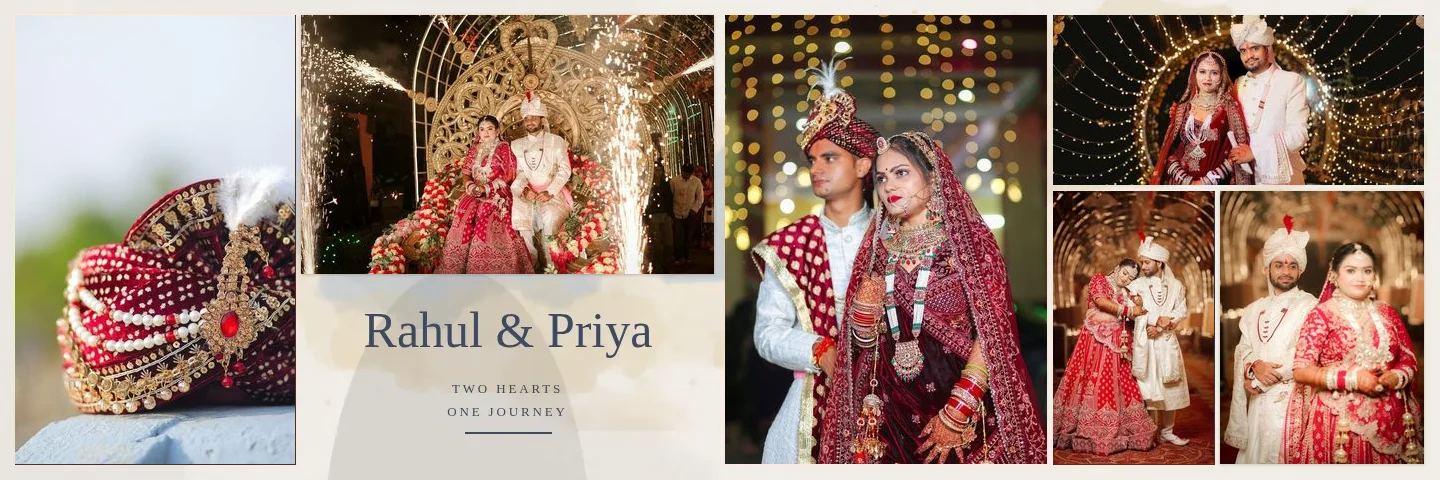
What Defines the Modern Editorial Style
- Papers: white and cream.
- Light washes in sand, dusty blue and sage.
- Frames: clean edges, thin lines and floating frames, no painted hero edges by default.
- Zero or one exposure area; many designs are close to a magazine layout.
Best For
- Minimal, contemporary couples
- Destination and city weddings
- Photographers whose photos carry the design on their own
All 16 Modern Editorial Templates
Each template is designed for the photo count shown and adapts to other counts. The split is how the photos are divided between the left and right page at 12 × 36 in; nothing is placed across the centre fold. Library version 2.
| Template | Photos | Split (left + right) | Exposure areas | Paper | Full bleed |
|---|---|---|---|---|---|
| Modern Editorial 01 | 5 | 2 + 3 | 1 | white | Yes |
| Modern Editorial 02 | 6 | 3 + 3 | 0 | cream | No |
| Modern Editorial 03 | 6 | 3 + 3 | 1 | white | Yes |
| Modern Editorial 04 | 6 | 2 + 4 | 0 | cream | No |
| Modern Editorial 05 | 7 | 4 + 3 | 1 | white | Yes |
| Modern Editorial 06 | 7 | 3 + 4 | 0 | cream | No |
| Modern Editorial 07 | 7 | 3 + 4 | 1 | white | No |
| Modern Editorial 08 | 7 | 4 + 3 | 0 | cream | Yes |
| Modern Editorial 09 | 8 | 5 + 3 | 1 | white | No |
| Modern Editorial 10 | 8 | 4 + 4 | 0 | cream | Yes |
| Modern Editorial 11 | 8 | 3 + 5 | 1 | white | No |
| Modern Editorial 12 | 8 | 5 + 3 | 0 | cream | No |
| Modern Editorial 13 | 8 | 4 + 4 | 1 | white | Yes |
| Modern Editorial 14 | 9 | 5 + 4 | 0 | cream | No |
| Modern Editorial 15 | 10 | 5 + 5 | 1 | white | Yes |
| Minimal Portrait | 1 | 0 + 1 | 0 | blush pink | No |
Photo counts: 1 × 1 photos, 1 × 5 photos, 3 × 6 photos, 4 × 7 photos, 5 × 8 photos, 1 × 9 photos, 1 × 10 photos. Papers used: white, cream, blush pink.
Tips for Modern Editorial Albums
- Editorial layouts expose every crop, so check horizons and spacing carefully in the editor.
- Keep text short: a title and a line of caption reads better than paragraphs on a clean spread.
Using a Modern Editorial Template
In Album Studio, open Templates, choose the Modern Editorial category chip and pick a template. AI Editor fills it from your selected photos; Manual opens it with empty frames in the editor. Follow how to create a wedding album with AI for the full flow. Sample spreads on this page use licensed sample wedding photos; your own photos take their place.
Frequently Asked Questions
What makes editorial templates different from the others?
They use fewer decorative treatments: clean or thin-line frames instead of painted edges, and in some templates no exposure area, so the photos and white space carry the design.
Can I remove the watercolour wash entirely?
Yes. The wash is its own layer in the editor; hide or delete it for a plain white or cream page.
Related Template Styles
- Cinematic templates15 cinematic wedding album templates for 12x36, 14x40 and custom sizes: large portrait exposures, cool teal and dusty-blue washes, 5 to 10 photos per spread.
- Light Elegant templates15 light, elegant wedding album templates: white, blush and cream pages, white mats, painted edges and pastel washes, for 12x36, 14x40 and custom sizes.
- Storytelling templates15 storytelling wedding album templates that sequence moments across both pages: cream, warm and white papers, mixed frames, 6 to 10 photos per spread.
Learn More
Start an Album With a Modern Editorial Template
Choose a template, pick the album size and let your photos fill the slots, then refine any sheet in the editor.